Introduction
In recent years, I’ve seen many teams frequently mention “skills”: some treat it as a prompt template, others as a shortcut command, and some as a switch to let AI work automatically. As a result, the more tools there are, the more chaotic the process becomes, with no reduction in rework.
Many development efficiency issues arise not from a lack of coding ability but from not placing skills in the right context. When skills should be used, they are handwritten; when they shouldn’t be used, templates are forced. This leads to a common scenario: every step seems fast, but the entire chain slows down.
A significant turning point for me was shifting my focus from “whether I can use a skill” to “in what scenarios to use a skill.” Since then, my review approval rates, repair speeds, and contextual consistency have stabilized significantly. Today, I won’t discuss concepts but will directly address practical applications: how to use skills in software development effectively to enhance efficiency rather than create new burdens.
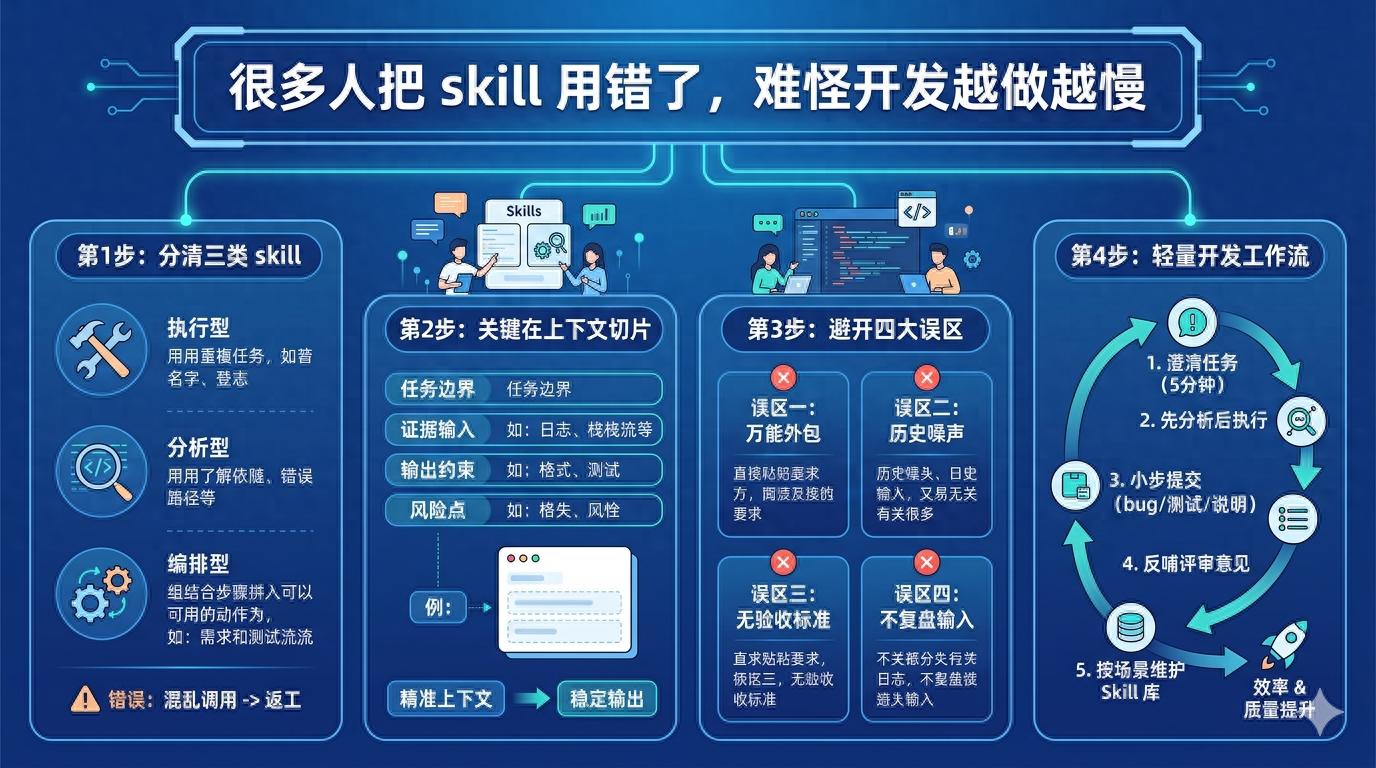
Part One: Distinguishing Three Types of Skills
I typically categorize skills in development into three types: Execution Skills, Analytical Skills, and Orchestration Skills. Though these terms may sound abstract, they correspond to everyday tasks very intuitively.
Execution Skills aim to “reduce repetitive tasks.” Examples include batch renaming files, standardizing log formats, supplementing test templates, and generating API call skeletons. They handle manual labor but do not make directional judgments.
Analytical Skills aim to “shorten understanding time.” Examples include scanning module dependencies, pinpointing error chains, comparing implementation path differences, and summarizing key reasons for failed builds. They act as a quick code-reading assistant, but you must provide clear boundaries; otherwise, they may analyze the entire repository.
Orchestration Skills aim to “string together multi-step processes into reusable actions.” For instance: pulling requirement context → generating initial changes → running targeted tests → outputting change notes. They provide the most value but are also the easiest to mismanage; if preconditions are not well-defined, every subsequent step amplifies errors.
Many people fall into traps here: they force execution skills to directly modify code for analytical tasks or only write a single action for multi-step processes. The result appears automated, but it requires manual cleanup each time.
A simple judgment method: if you haven’t clarified “why to change,” start with analytical skills; if the goal is clear but actions are repetitive, use execution skills; if similar tasks recur more than three times a week, consider orchestration skills. Don’t reverse the order.
Part Two: The Key to Effectively Using Skills Lies in Contextual Slicing
A common question I encounter is: “Why does this skill work inconsistently?” The likely culprit is not the model but the scattered context you provide.
In software development, context is not about “the more, the better” but rather “sufficient and controllable.” I generally use a three-layer slicing method:
- Task Boundaries: Specify what to change and what not to change. For example, “only handle payment callback timeout retries, without touching the order state machine.” This seemingly ordinary statement can directly prevent skills from inadvertently modifying unrelated files.
- Evidence Input: Log snippets, error stacks, relevant function entries, and the most recent failed submissions. Without evidence, skills can only guess. If you let them guess, they will provide you with “seemingly reasonable” text rather than verifiable conclusions.
- Output Constraints: Specify required formats, target files, whether to include test commands, and whether change reasons are needed. The clearer the output constraints, the easier your subsequent reviews will be.
Here’s a very practical tip: write the skill’s input as a “task card” with four fixed lines—goal, scope, evidence, product. Don’t underestimate this action; it allows the same skill to produce stable outputs in different hands, avoiding the situation where one person uses it well, but another fails.
Another piece of advice: when tasks involve uncertainty, don’t immediately demand “direct modifications.” First, let the skill provide two options and risk points, then choose one to execute. Spending those extra seconds often saves you two hours of rework later.
Part Three: Common Skill Misconceptions in Development, Often Related to Rework
Misconception One: Treating Skills as “Universal Outsourcing”. Some colleagues paste the original requirement text and expect the skill to complete everything automatically, resulting in a lot of code that compiles but is hard to maintain. The root cause is simple: requirement texts are not engineering constraints; the reality of the repository is.
Misconception Two: Feeding Too Much Historical Context at Once. Stuffing in dozens of issues and chat records may seem comprehensive, but it actually creates high noise. Skills will prioritize “high-frequency words” rather than “key facts.” I recommend retaining only materials directly related to the current changes.
Misconception Three: Allowing Skills to Deliver Without Acceptance Criteria. If you say, “help me optimize,” it will only provide a “seemingly more elegant” rewrite. If you specify, “change the interface timeout from 15 seconds to configurable, default 8 seconds, and add a regression test,” it will understand what completion means.
Misconception Four: Blaming Tools for Failures Without Reviewing Inputs. Many people only look at results without examining processes: if expectations aren’t met, they switch models, platforms, or prompts. In reality, most failures can be traced back to input structure issues, especially when scope and constraints are vaguely defined.
In my team, we have a small rule: if the same type of task is reworked twice in a row, we must review the skill input template rather than just fixing the code. This rule may seem strict, but it actually saves time because it directly addresses the root cause of “repeatedly stepping into the same pit.”
Part Four: A Practical Skill Workflow Suitable for Daily Development Rhythm
If you want to start using skills now, I recommend beginning with a lightweight process rather than jumping straight into a fully automated pipeline. Here’s a sequence I find effective:
- Clarify the Task in 5 Minutes. Clearly write down the goal, boundaries, and risk points, especially the “untouchable parts.” Skipping this step will amplify deviations in every subsequent step.
- Analyze Before Executing. Let analytical skills outline the impact: which modules will be changed, what tests may be triggered, and what pitfalls similar changes have encountered historically. After your confirmation, let execution skills implement the code.
- Submit Small Changes Instead of Large Ones. Each round should address a single, clear issue, such as fixing a bug first, then adding tests, and finally organizing documentation. Skills are more likely to succeed with smaller tasks, making it easier for you to roll back quickly.
- Feed Review Feedback Back into Skill Templates. For instance, if reviews frequently mention “inconsistent naming” or “uncovered boundary conditions,” write these into output constraints. In future similar tasks, skills will automatically avoid half of the issues.
- Maintain a Skill Library According to Context. Avoid creating a “universal skill.” Break it down into bug fixes, refactoring, test supplementation, documentation synchronization, and release notes, each doing one thing. The quantity can be large, but responsibilities should be singular.
The greatest value of this process is not to make you “more like an AI driver” but to reduce team collaboration costs. Because the same skill yields more predictable results in different hands, handovers are smoother, and reviews are more focused.
Additionally, skills have an underappreciated role: they can make implicit experiences explicit. Previously, many judgments known only to “old colleagues” can be documented in skills, allowing newcomers to work by the same standards. Team stability will significantly improve.
Conclusion
In essence, skills in software development are not about “writing code for you” but about “reducing ineffective trial and error.” If you treat them as flashy tools, they will amplify chaos; if you treat them as process components, they will continuously enhance efficiency.
I am increasingly convinced of one thing: the real differentiator is not who uses the new tools first but who embeds the tools into a reusable, verifiable, and collaborative workflow. The former is just novelty; the latter is productivity.
If you’ve recently felt that “despite using skills a lot, why are you still tired?” consider starting with a small task: break down your most frequently performed task into four lines—goal, boundary, evidence, product—and run it for a week. You will intuitively see a decrease in rework, a stabilization of rhythm, and an easier consensus within the team.
Comments
Discussion is powered by Giscus (GitHub Discussions). Add
repo,repoID,category, andcategoryIDunder[params.comments.giscus]inhugo.tomlusing the values from the Giscus setup tool.